TEL:+86 132 6656 7067





Rack-mount and wall-mount fiber enclosures provide organized termination, protection, and distribution for optical fiber connections. Both can accommodate fiber adapters, splice trays, pigtails, and cable management components, but they are designed for different installation environments.
Rack-mount fiber enclosures are installed in standard equipment racks or cabinets and are commonly used in data centers, telecommunications rooms, and central offices. Wall-mount fiber enclosures attach directly to building surfaces and are suitable for smaller distribution points, wiring closets, and locations without dedicated equipment racks.
The choice affects installation space, fiber capacity, cable routing, maintenance access, and future expansion. Selecting the right enclosure requires considering the network layout and the number of fiber connections rather than focusing on mounting style alone.
1. What Is a Rack-Mount Fiber Enclosure?
A rack-mount fiber enclosure is a housing designed to fit into a standardized equipment rack or cabinet. Most indoor models use a 19-inch mounting format, although other rack widths and specialized configurations are also available.
These enclosures organize incoming fiber cables, splice trays, adapter panels, and patch connections within a centralized equipment space. Depending on the design, they may provide fixed, sliding, or removable access to internal components.
1.1 Main Components
Rack mounting brackets: Secure the enclosure to the vertical rails of an equipment rack.
Adapter panels: Hold LC, SC, FC, or other fiber adapters for optical connections.
Splice trays: Protect and organize fusion-spliced fibers and splice protectors.
Cable entry points: Provide designated openings for incoming and outgoing fiber cables.
Slack management: Store excess fiber while maintaining the required bend radius.
Patch cord management: Organize front-facing connections and reduce cable congestion.
Access panels or drawers: Provide access for installation, inspection, and maintenance.
1.2 Common Rack-Mount Designs
Rack-mount fiber enclosures are available in several configurations:
Fixed enclosures: Provide a stationary housing for fiber adapters and internal cable management.
Sliding enclosures: Extend from the rack to improve access to internal connections.
Modular enclosures: Accept interchangeable adapter panels, splice cassettes, or fiber cassettes.
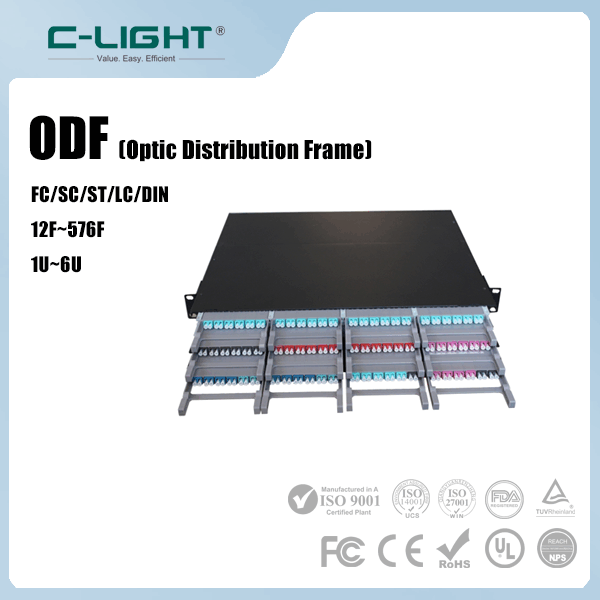
High-density enclosures: Maximize fiber connection capacity within limited rack space.
Rack-mount splice enclosures: Combine fiber termination, splicing, and cable storage functions.
2. What Is a Wall-Mount Fiber Enclosure?
A wall-mount fiber enclosure is a protective housing attached directly to a wall, backboard, or other suitable mounting surface. It provides a compact location for fiber termination, splicing, and distribution without occupying rack units.
Wall-mount enclosures are commonly installed in telecommunications closets, building entrances, utility rooms, branch offices, and fiber distribution points. Their capacity and internal layout vary according to the application and product design.
2.1 Main Components
Wall mounting structure: Provides secure attachment to a suitable surface.
Enclosure body and cover: Protect internal fiber components from accidental contact and environmental exposure appropriate to the enclosure rating.
Fiber adapter panels: Provide accessible optical connection points.
Splice trays: Organize fusion splices and protect individual fibers.
Cable entry ports: Guide incoming feeder cables and outgoing distribution cables.
Fiber storage areas: Manage excess fiber and maintain bend-radius requirements.
Locks or access controls: Restrict access to internal connections on models designed with security features.
2.2 Common Wall-Mount Designs
Compact terminal boxes: Used for a small number of fiber connections.
Wall-mount patch panels: Provide adapter-based termination and patching.
Splice enclosures: Organize incoming cables and fusion-spliced pigtails.
Distribution enclosures: Support multiple outgoing fiber connections.
Modular wall-mount enclosures: Accept interchangeable adapter or splice components where supported by the product design.
3. Rack-Mount vs Wall-Mount Fiber Enclosure: Key Differences
The primary difference is the mounting location and the way each enclosure integrates into the network infrastructure. Rack-mount designs fit centralized equipment layouts, while wall-mount designs provide localized fiber distribution without requiring a rack.
| Comparison | Rack-Mount Fiber Enclosure | Wall-Mount Fiber Enclosure |
|---|---|---|
| Installation | Equipment rack or cabinet | Wall or mounting backboard |
| Rack Space | Occupies rack units | Does not occupy rack units |
| Typical Environment | Data centers and equipment rooms | Wiring closets and building distribution points |
| Fiber Capacity | Often designed for higher-density configurations | Varies from compact to relatively high-capacity designs |
| Expansion | Can use additional rack units or modular panels | Limited by enclosure dimensions and mounting space |
| Cable Management | Integrated rack-based routing and patch cord organization | Internal storage and cable routing within the enclosure |
| Access | Front, rear, or sliding access depending on design | Access through enclosure doors or covers |
| Installation Requirements | Compatible rack rails and available rack space | Suitable wall structure and secure mounting points |
| Port Density | Generally suitable for high-density patching | Usually optimized for localized distribution |
| Maintenance | Convenient in centralized rack environments | Convenient at localized connection points |
| Typical Applications | Data center cross-connects and telecom aggregation | Building entrances, branch offices, and floor distribution |
4. Installation Space and Mounting Requirements
Available installation space is one of the first factors to consider when selecting a fiber enclosure. The mounting structure determines where the enclosure can be installed and how technicians access its connections.
4.1 Rack-Mount Installation
Rack-mount enclosures are installed between the vertical mounting rails of an equipment rack. Common designs use standardized rack-unit dimensions, such as 1U, 2U, and 4U, allowing multiple enclosures to be arranged vertically.
The installation plan must account for available rack units, cable entry direction, patch cord routing, front and rear access, and clearance for sliding drawers where applicable. Rack space may also be shared with switches, servers, power distribution units, and other equipment.
4.2 Wall-Mount Installation
Wall-mount enclosures require a suitable surface with sufficient structural support. Installation planning should consider enclosure weight, mounting hardware, cable entry direction, door clearance, and access for maintenance.
Wall-mounted units can preserve valuable rack space, but they still require adequate working clearance. A location that is too high, too low, or obstructed by other equipment can make patching and inspection difficult.
4.3 Installation Environment
Both enclosure types must be installed in locations that meet their specified environmental requirements. Indoor models should not be assumed suitable for outdoor exposure. Outdoor or harsh-environment applications require enclosures with appropriate ingress protection, sealing, temperature ratings, and cable-entry provisions.
5. Fiber Capacity and Port Density
Fiber capacity determines how many connections an enclosure can accommodate. Rack-mount models are frequently designed for dense patching environments, while wall-mount models are commonly used for smaller distribution areas. However, actual capacity depends on the enclosure dimensions, adapter type, cassette design, and internal cable management.
5.1 Rack-Mount Fiber Capacity
Rack-mount enclosures can support multiple adapter panels or modular cassettes. A high-density design may accommodate a substantial number of LC connections within a limited number of rack units.
For example, some commercial 1U platforms support up to 96 LC fibers or more, depending on the connector arrangement and product architecture. Higher capacities may be achieved through larger enclosures, specialized adapters, or MPO-based cassette systems.
5.2 Wall-Mount Fiber Capacity
Wall-mount capacity varies considerably. Compact boxes may support only a small number of adapter connections, while larger wall-mount enclosures can accommodate multiple adapter panels, splice trays, and substantial fiber counts.
The available internal space must support not only the adapters but also incoming cable preparation, splice protection, fiber routing, and slack storage. Selecting a unit based only on its advertised port count can lead to difficult cable management.
5.3 Capacity Planning
When estimating enclosure capacity, consider the number of active connections, spare ports, incoming cable fibers, splice requirements, and expected network growth. The usable capacity may be lower than the maximum adapter count when the enclosure also contains splice trays or fiber storage components.
6. Cable Management and Bend Radius Protection
Fiber cable management is essential in both rack-mount and wall-mount installations. Optical fibers are sensitive to excessive bending, pulling tension, and mechanical pressure. Poor routing can increase attenuation or damage the fiber.
6.1 Rack-Mount Cable Management
Rack-mount enclosures often include front cable guides, rear cable entry areas, routing brackets, and internal slack storage. Sliding designs can improve access to adapters and splice trays without requiring technicians to remove the entire enclosure.
In high-density environments, organized patch cord routing is particularly important. Proper separation of incoming trunks and front-facing patch cords helps reduce congestion and makes individual connections easier to identify.
6.2 Wall-Mount Cable Management
Wall-mount enclosures manage fiber within a more compact housing. Internal spools, routing guides, splice trays, and cable retention features help organize incoming and outgoing fibers.
Technicians must also consider how external cables approach the enclosure. Poor cable routing outside the housing can place unnecessary tension on entry points or create tight bends near the enclosure.
6.3 Bend Radius and Slack Storage
Both designs must maintain the minimum bend radius specified by the cable and enclosure manufacturers. The required radius can differ between cable types and between installation and long-term operating conditions.
Excess fiber should be stored in designated areas rather than forced into unused enclosure space. Proper slack management supports future maintenance and reduces the risk of accidental fiber damage.
7. Maintenance and Accessibility
Maintenance access affects the time required to identify, inspect, and repair fiber connections. The best enclosure design provides enough clearance to reach adapters, splice trays, and cable entry points without disturbing unrelated connections.
7.1 Rack-Mount Maintenance
Rack-mount enclosures are positioned within centralized equipment areas where technicians can manage multiple fiber connections in one location. Sliding drawers and removable panels can simplify access to internal components.
However, dense rack layouts may restrict access if patch cords, neighboring equipment, or cable managers obstruct the enclosure. Rack planning should include enough space for maintenance and future changes.
7.2 Wall-Mount Maintenance
Wall-mount enclosures provide direct access at localized distribution points. Doors or removable covers allow technicians to inspect connections and reach internal components.
Access depends on the mounting height, door opening direction, surrounding equipment, and available working area. Lockable models can also help protect connections in shared or publicly accessible locations.
7.3 Labeling and Documentation
Regardless of mounting type, clear labeling is necessary for efficient troubleshooting. Fiber identifiers should correspond to cable schedules, port assignments, splice records, and network documentation.
8. Scalability and Network Expansion
Network growth can increase the number of fiber connections, splice points, and distribution routes. Enclosure selection should account for both current requirements and expected expansion.
8.1 Rack-Mount Expansion
Rack-based systems can expand by adding more rack-mount enclosures, adapter panels, or modular cassettes when compatible with the platform. This approach works well in centralized environments where additional rack space is available.
Modular designs can also allow technicians to introduce different connector formats or fiber configurations without replacing the entire enclosure. Compatibility between the chassis, adapter panels, and cassettes must be verified.
8.2 Wall-Mount Expansion
Wall-mount systems can expand through larger enclosures or additional distribution boxes. However, the available wall area, cable pathways, and access clearance may limit future growth.
Where fiber counts are expected to increase significantly, the installation may eventually require a larger enclosure or a centralized rack-based distribution point.
8.3 Planning for Future Capacity
A practical design should reserve spare adapter positions, cable entry capacity, and internal storage space. It should also consider whether future connections will be added at the same distribution point or moved to a separate enclosure.
9. Cost and Deployment Considerations
The total cost of a fiber enclosure installation includes more than the enclosure itself. Mounting hardware, adapter panels, splice trays, cable management accessories, installation labor, and maintenance requirements all contribute to project cost.
9.1 Rack-Mount Enclosure Costs
Rack-mount systems may require an existing rack or cabinet, available rack units, and compatible accessories. High-density modular enclosures can involve additional costs for cassettes, adapter panels, and sliding mechanisms.
In centralized networks, however, rack-based installation can simplify cable organization and allow multiple distribution systems to share the same equipment area.
9.2 Wall-Mount Enclosure Costs
Wall-mount enclosures can avoid the need for a dedicated equipment rack. Compact models may be practical for small fiber distribution points, although larger or outdoor-rated enclosures can require more substantial mounting hardware and environmental protection.
Installation cost also depends on wall construction, cable access, mounting location, and the number of fiber connections.
9.3 Total Deployment Cost
For a fair comparison, evaluate the complete installation rather than the enclosure purchase price alone. A rack-mount solution may be more efficient when rack infrastructure already exists, while a wall-mount solution may reduce infrastructure requirements at a small remote location.
10. Applications of Rack-Mount and Wall-Mount Fiber Enclosures
10.1 Data Centers
Rack-mount fiber enclosures are widely used in data centers to organize backbone fiber, equipment connections, and cross-connects. They can support LC patching, MPO/MTP trunk distribution, and modular cassette architectures.
High-density rack systems are particularly useful where large numbers of optical connections must be managed around switches, servers, and other network equipment.
10.2 Telecommunications Rooms and Central Offices
Rack-mount enclosures provide centralized termination and distribution for building backbones, campus links, and telecommunications infrastructure. They can integrate with other rack-based optical distribution equipment.
Wall-mount enclosures are also suitable for smaller telecommunications rooms where the fiber count does not justify a full rack installation.
10.3 Enterprise Buildings and Floor Distribution
Wall-mount enclosures are useful at intermediate distribution points on individual floors or in building service areas. They provide localized access to feeder and distribution fibers without consuming rack space.
10.4 FTTH and FTTx Networks
Wall-mount fiber enclosures can serve as indoor distribution or termination points in fiber-to-the-home and fiber-to-the-building deployments. Depending on the design, they may organize feeder fibers, drop cables, splitters, adapters, and splice trays.
Rack-mount enclosures are more commonly used at centralized headends, equipment rooms, and aggregation locations where fiber connections are concentrated.
11. How to Choose the Right Fiber Enclosure
The correct enclosure should match the physical installation environment, fiber count, connection layout, and maintenance requirements. The following factors provide a practical selection framework.
11.1 Choose Rack-Mount Fiber Enclosures When
The installation already uses standard equipment racks or cabinets.
A high number of fiber connections must be organized centrally.
The network requires modular adapter panels or cassette-based distribution.
Future expansion can be accommodated through additional rack units.
Fiber patching must be integrated with switches and other rack equipment.
Centralized access and structured cable management are priorities.
11.2 Choose Wall-Mount Fiber Enclosures When
No equipment rack is available or required.
The fiber distribution point is located in a building, floor, or remote room.
Rack space needs to be reserved for active equipment.
The connection count is appropriate for the enclosure's available capacity.
Direct access to a localized termination point is preferred.
The mounting surface and environmental conditions meet the enclosure requirements.
11.3 Selection Checklist
Mounting format: Confirm rack dimensions or wall-mount requirements.
Fiber count: Calculate current connections and expected expansion.
Connector type: Verify LC, SC, MPO/MTP, or other adapter compatibility.
Splicing requirements: Determine whether splice trays or pigtail storage are needed.
Cable entry: Check entry direction, cable diameter, and strain-relief requirements.
Internal capacity: Confirm adequate space for adapters, splices, and fiber slack.
Access design: Evaluate front, rear, side, sliding, and door access.
Environmental rating: Match the enclosure to indoor, outdoor, or harsh-environment conditions.
Expansion plan: Reserve space for future adapters, cassettes, or additional enclosures.
Documentation: Ensure ports and cables can be clearly labeled and identified.
12. Can Rack-Mount and Wall-Mount Fiber Enclosures Be Used Together?
Yes. Many fiber networks use both enclosure types at different distribution levels. A centralized rack-mount enclosure can manage backbone fibers in a main equipment room, while wall-mount enclosures provide localized distribution in building areas or remote locations.
For example, a campus network may terminate incoming building backbone cables in a rack-mount enclosure at the main distribution facility. Fiber cables can then extend to wall-mount enclosures in individual buildings or floor-level telecommunications rooms.
This hybrid architecture separates centralized aggregation from local distribution. It can also reduce the need to route every individual fiber connection back to one equipment room.
13. Conclusion
Rack-mount and wall-mount fiber enclosures serve the same fundamental purpose: protecting, organizing, and distributing optical fiber connections. Their main difference lies in how they integrate with the physical network infrastructure.
Rack-mount enclosures are generally better suited to centralized, high-density environments such as data centers, telecommunications rooms, and central offices. Wall-mount enclosures are practical for localized distribution points, building networks, and installations where rack space is unavailable or unnecessary.
The final selection should account for fiber capacity, connector compatibility, cable routing, bend-radius protection, installation access, environmental requirements, and future expansion. In larger networks, combining both enclosure types can provide an effective balance between centralized management and distributed fiber access.
 >

 >
 >
 >
 >
 >
 >
 >