TEL:+86 132 6656 7067




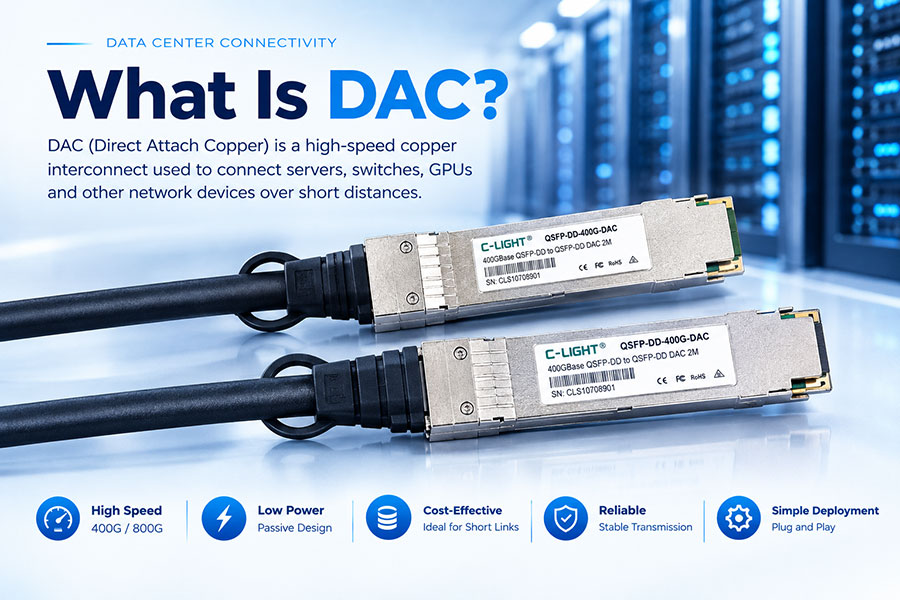
DAC, or Direct Attach Copper, is a high-speed copper interconnect used to connect servers, switches, GPUs, and other network devices over short distances. DAC cables integrate the cable and connectors into one assembly, providing a simple and cost-effective solution for high-bandwidth data center connections.
1. What Is DAC?
DAC stands for Direct Attach Copper. It is a pre-terminated copper cable assembly with high-speed connectors attached directly to both ends.
Unlike an optical transceiver link, DAC does not require separate optical modules and fiber cables. The electrical signal travels directly through the copper conductors between the connected devices.
2. How Does a DAC Cable Work?
A DAC cable connects two compatible high-speed ports through copper conductors. In a passive DAC, there is no active signal conversion inside the cable. The electrical signal is transmitted directly from one device to the other.
Some DAC-related active copper solutions include electronic components to improve signal integrity and extend the practical electrical reach.
3. What Are the Main Components of a DAC?
A typical DAC assembly includes copper conductors, shielding and insulation, high-speed connectors, and the mechanical housing required to connect with the host equipment.
Depending on the cable type, additional electronic components may be integrated into the connector housing.
4. Passive DAC vs Active DAC
| Feature | Passive DAC | Active Copper Cable |
|---|---|---|
| Transmission medium | Copper | Copper |
| Active electronics | No | Yes |
| Power consumption | Very low | Higher |
| Reach | Short | Longer than passive DAC |
| Cost | Lower | Higher |
| Typical use | Short high-speed links | Extended copper links |
Passive DAC is commonly selected when the connection is short enough to meet the required electrical performance. Active copper solutions are useful when additional signal conditioning is required.
5. What Data Rates Does DAC Support?
DAC technology is available for multiple generations of high-speed networking, including 10G, 25G, 40G, 100G, 200G, 400G, and 800G applications.
As data rates increase, cable construction, connector performance, signal integrity, and maximum reach become increasingly important.
6. What Is the Maximum Distance of DAC?
DAC is primarily designed for short-reach connectivity. Typical passive DAC lengths are often from around 0.5m to a few meters, depending on the data rate and cable design.
The actual maximum distance is determined by electrical performance rather than cable length alone. Longer copper links may require active signal conditioning or a transition to optical connectivity.
7. Why Is DAC Used in Data Centers?
Data centers require large numbers of high-speed connections between servers, switches, storage systems, and accelerators. DAC provides a practical solution for short connections where optical transmission is not necessary.
Its integrated design simplifies installation while helping reduce connection cost and power consumption.
8. DAC for Server-to-Switch Connections
Server-to-switch connections are one of the most common DAC applications. When a server and Top-of-Rack switch are located close together, DAC can provide a direct high-speed connection without separate optical transceivers and fiber patch cables.
This makes DAC suitable for short intra-rack network architectures.
9. DAC for GPU-to-Switch Connections
AI and HPC systems require high-bandwidth connectivity between GPUs, compute servers, and network switches. Short physical distances within high-density racks make DAC an attractive option for selected GPU-to-switch links.
400G and 800G DAC solutions are increasingly used for short high-speed connections in AI infrastructure.
10. DAC for Switch-to-Switch Connections
DAC can also be used between switches when the physical distance is sufficiently short.
For example, adjacent switches within a rack or closely positioned network devices can use DAC to reduce cabling complexity and connection cost.
11. DAC and PAM4 Signaling
Modern 200G, 400G, and 800G interfaces commonly use PAM4 signaling to increase the amount of data transmitted per electrical lane.
PAM4 allows higher data rates while increasing the requirements for signal integrity. For DAC designs, insertion loss, return loss, crosstalk, jitter, impedance control, and connector performance become especially important at higher speeds.
12. DAC vs Optical Transceiver
| Feature | DAC | Optical Transceiver |
|---|---|---|
| Medium | Copper | Optical fiber |
| Reach | Short | Short to long |
| Power | Very low for passive DAC | Depends on module |
| Installation | Simple | Requires module and fiber |
| Flexibility | Limited | High |
| Cost for short links | Generally lower | Generally higher |
DAC is typically preferred for short, fixed connections, while optical transceivers are better suited to longer links and networks requiring greater flexibility.
13. DAC vs AOC
DAC uses copper, while AOC, or Active Optical Cable, uses optical fiber with active optical components integrated into the cable assembly.
DAC generally provides lower power consumption and lower cost for short links. AOC offers longer reach, lower cable weight, and better immunity to electromagnetic interference.
14. DAC vs AEC
DAC and AEC both use copper, but AEC includes active electronics for signal conditioning.
Passive DAC is usually the better choice for the shortest connections where low power and cost are priorities. AEC becomes useful when a longer electrical reach is required without moving to an optical cable.
15. What Are the Advantages of DAC?
DAC offers several benefits for short-distance high-speed networking.
Low cost: An integrated cable assembly can reduce the cost of short connections.
Low power: Passive DAC does not require optical conversion.
Low latency: The electrical path is simple and direct.
Simple installation: No separate optical transceivers or fiber patch cables are required.
High bandwidth: DAC is available for modern high-speed interfaces.
16. What Are the Limitations of DAC?
The main limitation of DAC is its short transmission distance.
Copper cables are also generally thicker and heavier than fiber cables. In high-density racks, large numbers of copper connections can increase cable-management requirements and affect available space and airflow.
For longer links, AOC or optical transceiver solutions are normally more practical.
17. DAC Cable Length and Cable Gauge
Cable gauge affects the electrical characteristics and mechanical properties of a DAC cable. Thicker conductors can help reduce electrical resistance and signal loss, but they also increase cable size and weight.
High-speed DAC design therefore involves balancing signal performance, flexibility, physical size, and installation requirements.
18. DAC Applications in AI Data Centers
AI data centers contain dense clusters of GPUs, CPUs, switches, and high-performance networking equipment. Short connections within these systems are suitable for DAC when the electrical channel requirements can be met.
Common applications include GPU-to-switch, server-to-switch, intra-rack, and short switch-to-switch connections.
19. 400G and 800G DAC
400G DAC is designed for short-reach high-bandwidth connections in data centers, AI clusters, and HPC environments.
800G DAC provides even higher bandwidth for next-generation AI and high-performance networking. Because higher data rates place tighter requirements on signal integrity, cable construction and connector performance become increasingly important.
20. How to Choose the Right DAC Cable?
Selecting a DAC should start with the host interfaces and required cable length. The following factors should be considered:
Data rate: Confirm that the cable supports the required 40G, 100G, 400G, 800G, or other interface speed.
Connector type: Check the required QSFP, QSFP-DD, QSFP112, OSFP, or other interface.
Length: Select a cable length that matches the physical installation while remaining within its electrical specification.
Breakout configuration: Determine whether a direct connection or breakout connection is required.
Compatibility: Verify compatibility with the switches, servers, GPUs, and network adapters being used.
21. C-LIGHT DAC Solutions
C-LIGHT provides DAC solutions for high-speed data center connectivity, including 400G and 800G configurations.
C-LIGHT DAC products are designed for short-reach applications such as server-to-switch, GPU-to-switch, switch-to-switch, AI data centers, and HPC networks. Multiple connector and breakout configurations are available to support different network architectures.
22. What Is DAC? Conclusion
DAC, or Direct Attach Copper, is a short-reach high-speed interconnect that provides a simple and efficient alternative to optical connectivity for suitable data center applications.
Its low power consumption, low latency, low cost, and simple installation make DAC particularly suitable for short connections between servers, GPUs, and switches. As network speeds continue to increase, proper attention to cable length, connector type, signal integrity, and system compatibility is essential when selecting DAC.
 >
>

 >
>
 >
>
 >
>
 >
>
 >
>
 >
>
 >
>