TEL:+86 132 6656 7067





Optical transceivers deployed in Cisco and Juniper networks may share identical form factors, data rates, wavelengths, and optical interfaces, yet differ in how the host equipment identifies and accepts them. This distinction matters when network operators source third-party optics, maintain multi-vendor infrastructure, or connect switches from different manufacturers.
Cisco-compatible optics are intended for supported Cisco networking platforms, while Juniper-compatible optics are configured or validated for supported Juniper equipment. The compatibility designation generally concerns module identification and host recognition rather than a different optical transmission technology. A 10GBASE-LR SFP+ module, for example, can use the same optical specifications in both versions while carrying different host identification profiles.
Successful deployment requires more than matching the vendor coding. The exact switch model, software version, port capabilities, optical standard, and remote-end interface all need to be considered.
1. What Are Cisco-Compatible Optical Transceivers?
Cisco-compatible optical transceivers are modules designed or configured for use with supported Cisco switches, routers, and other networking equipment. They may be manufactured by independent optical module suppliers and offered as alternatives to original Cisco-branded transceivers.
Depending on the product, the module may use an identification profile intended for a particular Cisco platform. The switch reads module information through its management interface and applies its own recognition and support policies.
Cisco provides an Optics-to-Device Compatibility Matrix that identifies qualified Cisco optical products for specific network devices, including applicable data rates, form factors, reach, and software requirements. This matrix is a reference for Cisco-qualified optics; it should not be interpreted as a blanket certification of independently manufactured third-party modules.
When selecting a third-party Cisco-compatible module, confirm:
Exact Cisco switch or router model.
Hardware revision and port type.
Operating system and software release.
Supported transceiver form factor and data rate.
Optical standard, wavelength, and transmission distance.
Module recognition and diagnostic monitoring behavior.
2. What Are Juniper-Compatible Optical Transceivers?
Juniper-compatible optical transceivers are modules designed or configured for supported Juniper Networks equipment, including switches, routers, and other networking platforms.
These modules may be supplied by independent manufacturers. Their identification information and product configuration are intended to meet the requirements of the specified Juniper host environment.
Juniper provides a Hardware Compatibility Tool (HCT) that allows users to search supported transceivers by device or product category. The tool provides information about compatible module types and relevant optical or cable characteristics.
Juniper also recommends using optical transceivers and connectors purchased from Juniper Networks. Its documentation states that JTAC provides complete support for Juniper-supplied optical modules and cables, while support for third-party components is limited.
Before selecting a Juniper-compatible module, verify:
Exact Juniper device model and hardware configuration.
Junos OS release and applicable platform requirements.
Supported port speed and transceiver form factor.
Optical interface and maximum transmission distance.
Module identification and diagnostic monitoring support.
Supplier testing and warranty arrangements.
3. Cisco-Compatible vs Juniper-Compatible Optics: Key Differences
| Category | Cisco-Compatible Optics | Juniper-Compatible Optics |
|---|---|---|
| Target platform | Supported Cisco switches, routers, and networking equipment | Supported Juniper switches, routers, and networking equipment |
| Host identification | Configured or validated for the intended Cisco platform | Configured or validated for the intended Juniper platform |
| Compatibility reference | Cisco Optics-to-Device Compatibility Matrix | Juniper Hardware Compatibility Tool |
| Software dependency | Recognition and support can depend on device and software release | Recognition and support can depend on device and Junos OS release |
| Third-party support | Depends on Cisco platform policies and third-party supplier support; Cisco's published policy excludes support for third-party optics | JTAC support for third-party optics is limited under Juniper's published guidance |
| Optical standards | Can support Ethernet and other applicable optical interfaces | Can support Ethernet and other applicable optical interfaces |
| Common form factors | SFP, SFP+, SFP28, QSFP+, QSFP28, QSFP-DD, and others where supported | SFP, SFP+, SFP28, QSFP+, QSFP28, QSFP-DD, and others where supported |
| EEPROM configuration | May use a Cisco-targeted identification profile | May use a Juniper-targeted identification profile |
| Cross-platform use | Not automatically suitable for Juniper equipment | Not automatically suitable for Cisco equipment |
| Primary selection requirement | Exact Cisco device and port compatibility | Exact Juniper device and port compatibility |
The main difference is the target host environment. The same optical design may be offered in separate Cisco-compatible and Juniper-compatible versions, but each version should be validated for its intended equipment.
4. EEPROM Coding and Vendor Identification
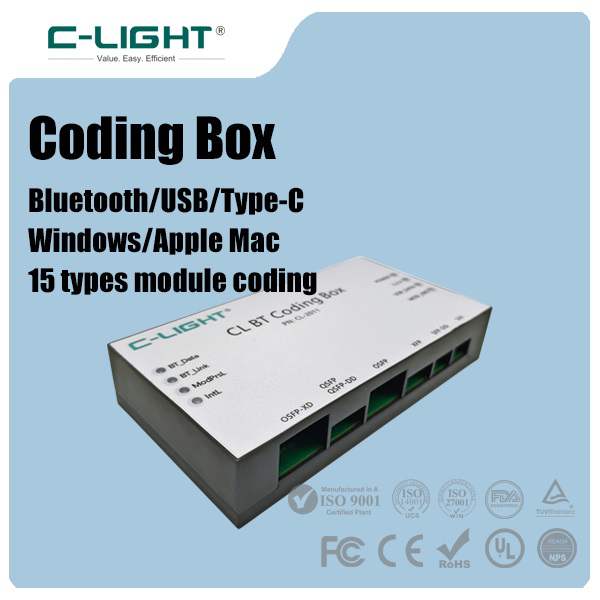
EEPROM information plays an important role in transceiver identification. When a module is inserted, the host reads stored identification and management data to determine its reported manufacturer, product model, capabilities, and other characteristics.
Depending on the transceiver form factor and management specification, relevant fields can include:
| Identification Field | Function | Compatibility Relevance |
|---|---|---|
| Vendor Name | Reports the module manufacturer's identification | May be checked by host recognition policies |
| Vendor OUI | Identifies the registered organization | Provides manufacturer identification information |
| Part Number | Identifies the module model | Can be used for product recognition and support checks |
| Revision | Indicates product revision information | Helps distinguish module versions |
| Wavelength | Reports the nominal optical wavelength | Helps identify the optical application |
| Serial Number | Identifies an individual module | Supports inventory and traceability |
| Diagnostic Data | Provides supported operating measurements | Enables monitoring functions where implemented |
Cisco-compatible and Juniper-compatible modules may use different identification configurations to meet the recognition requirements of their intended hosts. However, vendor coding alone does not establish full compatibility. The switch may also evaluate supported module types, port capabilities, and software-dependent policies.
For SFP and SFP+ products, SFF-8472 defines important serial identification and diagnostic monitoring information. Other form factors use their corresponding management specifications, including SFF-8636 and CMIS for applicable higher-speed modules.
5. Cisco and Juniper Transceiver Recognition Policies
Cisco and Juniper maintain their own equipment compatibility references and support policies. A third-party module that operates on one platform should not automatically be assumed to receive the same recognition or support on another.
Cisco's compatibility tools identify which Cisco optical products are qualified for particular devices. Cisco documentation also describes unsupported-transceiver messages and platform-specific conditions that can place an interface into an err-disabled state.
Juniper's Hardware Compatibility Tool identifies supported transceivers for individual devices. Juniper documentation also explains that JTAC support for third-party optical modules is limited and may involve checking the third-party component or replacing it with a Juniper-qualified equivalent when troubleshooting.
| Recognition Aspect | Cisco Equipment | Juniper Equipment |
|---|---|---|
| Compatibility reference | Optics-to-Device Compatibility Matrix | Hardware Compatibility Tool |
| Module information | Platform-specific transceiver identification commands | Platform-specific transceiver and diagnostics commands |
| Unsupported module behavior | May generate unsupported-transceiver messages or port restrictions | Behavior depends on platform, software, and module support status |
| Software considerations | Check the applicable IOS, IOS XE, NX-OS, or other platform release | Check the applicable Junos OS release |
| Third-party support | Cisco's published policy does not support third-party optics | JTAC support for third-party optics is limited |
These policies should be distinguished from the practical ability of a third-party module to establish a link. A module may operate successfully in a particular environment without being covered by the equipment manufacturer's official support policy.
6. Can One Transceiver Work on Both Cisco and Juniper Switches?
A single optical transceiver may support both Cisco and Juniper equipment if the product is specifically designed and validated for those platforms. However, a Cisco-compatible version should not automatically be treated as Juniper-compatible, or the reverse.
Suppliers may offer several configurations:
Cisco-specific version: Intended for supported Cisco platforms.
Juniper-specific version: Intended for supported Juniper platforms.
Universal version: Designed for multiple host platforms, subject to the supplier's validated equipment list.
Configurable version: Supplied with different identification profiles where the product supports configuration.
Before selecting a multi-vendor module, ask the supplier whether the same physical module can support both equipment environments, whether configuration changes are necessary, and whether both target platforms have been tested.
7. Can Cisco-Compatible and Juniper-Compatible Optics Work at Opposite Ends of the Same Link?
Yes. A Cisco-compatible module can be installed in a Cisco switch, while a Juniper-compatible module is installed in a Juniper switch at the opposite end of the optical link. The modules do not need identical vendor identification profiles, provided that each local host accepts its installed module and the two optical interfaces are interoperable.
Cisco switch → Cisco-compatible 10GBASE-LR SFP+ → Single-mode fiber → Juniper-compatible 10GBASE-LR SFP+ → Juniper switch.
Both modules use the same optical application. Their local host compatibility configurations are different, but their optical specifications must match.
For this type of connection, confirm:
Both modules support the same optical Ethernet standard.
Transmit and receive wavelengths are compatible.
Both ports support the required data rate.
Fiber type and connector specifications match.
Transmission distance and optical power budget are suitable.
FEC and interface settings are compatible where applicable.
The compatibility label applies to the local host. It does not determine whether the remote-end module is optically interoperable.
8. Optical Standards and Performance Requirements
Cisco-compatible and Juniper-compatible modules can share the same optical performance specifications. When evaluating products, engineers should focus on the optical application rather than assuming that one vendor version has inherently better transmission performance.
| Parameter | Verification Requirement |
|---|---|
| Data Rate | Confirm the required Ethernet or other interface speed |
| Wavelength | Check nominal transmit and receive wavelengths |
| Transmit Power | Verify the specified optical output power range |
| Receiver Sensitivity | Confirm minimum optical input requirements |
| Maximum Input Power | Check the receiver's maximum permitted optical input |
| Transmission Distance | Verify the supported reach under specified fiber conditions |
| Fiber Type | Confirm single-mode or multimode fiber requirements |
| Connector | Check LC duplex, MPO/MTP, or other supported interfaces |
| Power Consumption | Confirm host power and thermal limitations |
| FEC Requirements | Verify the required FEC mode and host configuration |
For example, two 100G QSFP28 modules may share a 100GBASE-LR4 optical specification but have different host identification profiles. Their optical link characteristics can be equivalent even though their compatibility configurations are intended for different switch platforms.
Likewise, identical form factors do not guarantee identical optical applications. A 100GBASE-SR4 module and a 100GBASE-LR4 module both use QSFP28 packaging, but they have different fiber, wavelength, connector, and reach requirements.
9. Compatibility Across Different Data Rates
Both Cisco-compatible and Juniper-compatible optics are available across multiple data rates and transceiver form factors, subject to the capabilities of the target networking equipment.
| Data Rate | Common Form Factor | Typical Network Applications |
|---|---|---|
| 1G | SFP | Enterprise access switching and fiber uplinks |
| 10G | SFP+ | Aggregation networks and data center links |
| 25G | SFP28 | Server connectivity and data center switching |
| 40G | QSFP+ | High-density aggregation and network interconnects |
| 100G | QSFP28 | Data center leaf-spine networks and high-speed uplinks |
| 400G | QSFP-DD / OSFP | High-performance data center and AI infrastructure |
| 800G | QSFP-DD / OSFP | High-bandwidth AI clusters and data center switching |
Not every Cisco or Juniper device supports every listed form factor or data rate. Port configuration, breakout mode, electrical lane mapping, power limits, and software support must be checked for the exact platform.
10. Third-Party Optics: Support and Warranty Considerations
Third-party compatibility and official equipment-vendor support are two separate issues. An independently manufactured module may work in a switch, but this does not necessarily mean that the switch manufacturer will provide full troubleshooting or warranty coverage for that component.
Cisco's published optics compatibility information states that Cisco does not support third-party optics. Juniper recommends Juniper-supplied optical components and explains that JTAC support for third-party optics is limited.
Network operators should therefore review the support arrangements of both the equipment manufacturer and the optical module supplier.
Confirm whether the third-party supplier provides product warranty coverage.
Request a tested equipment compatibility list.
Verify the optical specifications and product revision.
Clarify responsibility for troubleshooting module-related failures.
Check whether equipment warranty or support terms impose restrictions.
Keep test records for production deployments.
For critical network infrastructure, these considerations should be included in procurement and maintenance planning rather than evaluated only by the module purchase price.
11. How to Select the Correct Cisco-Compatible or Juniper-Compatible Module
Providing complete equipment information helps the supplier identify the appropriate compatibility version and avoid selecting a module based only on its form factor or data rate.
| Selection Item | Information to Provide |
|---|---|
| Equipment Brand | Cisco or Juniper |
| Equipment Model | Exact switch or router model |
| Hardware Revision | Relevant hardware or port-module configuration |
| Software Version | IOS, IOS XE, NX-OS, or Junos OS release |
| Port Type | SFP, SFP+, SFP28, QSFP28, QSFP-DD, OSFP, or other |
| Data Rate | 1G, 10G, 25G, 40G, 100G, 400G, or 800G |
| Optical Standard | SR, LR, ER, ZR, DR, FR, or another application |
| Fiber Type | Single-mode or multimode |
| Connector | LC duplex, MPO/MTP, or another interface |
| Transmission Distance | Required link reach and optical budget |
| Management | DDM, DOM, or CMIS requirements |
| Validation | Host recognition, port operation, and link testing |
For 400G and 800G applications, additional checks should include lane configuration, breakout requirements, FEC mode, thermal performance, and host power limitations.
12. Quality Control and Platform Validation
Reliable third-party optics require both optical performance testing and host compatibility validation. A module that is recognized by a switch has not necessarily passed all optical or interoperability requirements.
A practical validation process should include:
EEPROM verification: Check identification information and the intended compatibility configuration.
Host recognition: Test the module on the specified Cisco or Juniper equipment.
Port operation: Confirm that the interface reaches the expected operational state.
Optical testing: Verify transmit power and receiver sensitivity against the product specification.
Diagnostic monitoring: Check temperature, voltage, bias current, and optical power readings where supported.
Interoperability: Test the module with the intended remote-end transceiver.
Traffic testing: Validate stable operation under the required network conditions.
Environmental testing: Confirm operation within specified temperature and power limits.
For multi-vendor deployments, testing should cover representative models from each equipment family. A successful test on one Cisco switch or one Juniper switch does not establish compatibility across every product in that manufacturer's portfolio.
13. C-LIGHT Optical Transceiver Solutions
C-LIGHT provides optical transceiver solutions for enterprise networks, data centers, and high-speed fiber communication applications. Different compatibility configurations can be considered according to the target equipment, required optical interface, and deployment conditions.
Product categories cover different data rates and transceiver form factors for network switching, aggregation, data center interconnects, and high-speed optical links.
When requesting Cisco-compatible or Juniper-compatible optics, provide the exact equipment model, software version, port type, data rate, optical standard, and transmission distance. This allows the required module configuration and compatibility testing scope to be determined before deployment.
14. Conclusion
Cisco-compatible and Juniper-compatible optics serve different equipment environments. Their primary differences relate to host identification, platform recognition, compatibility validation, and equipment-vendor support policies rather than the fundamental principles of optical transmission.
A Cisco-compatible module should be checked against the intended Cisco device, while a Juniper-compatible module should be validated for the target Juniper platform. When connecting Cisco and Juniper switches over fiber, each end can use its own compatible module version as long as the optical specifications are interoperable.
The most reliable selection process combines exact equipment identification, optical specification verification, platform testing, and clear third-party support arrangements. For optical transceiver requirements across different data rates and form factors, view C-LIGHT optical transceiver products or Contact C-LIGHT for technical assistance.
 >

 >
 >
 >
 >
 >
 >
 >