TEL:+86 132 6656 7067





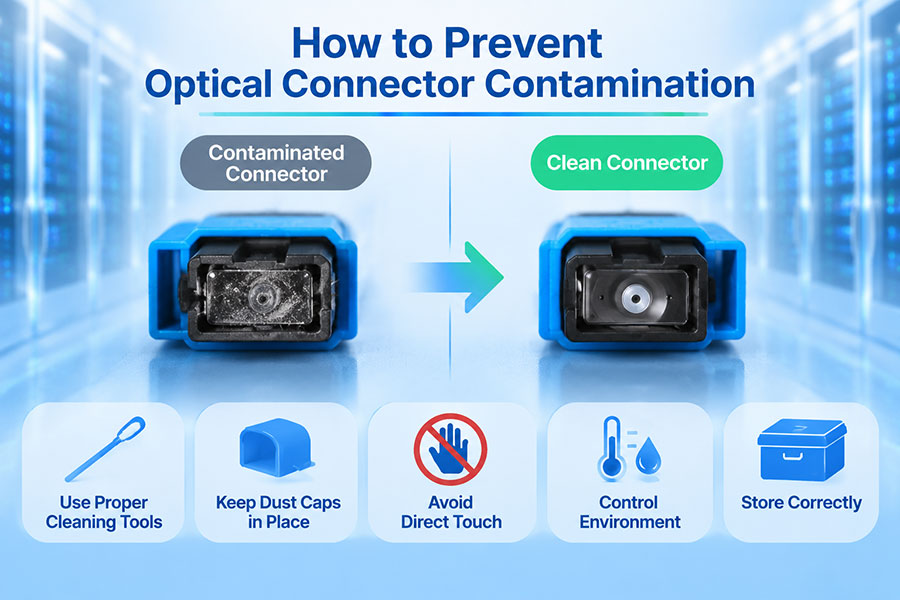
Optical transceiver connectors are sensitive to dust, oil, moisture, and other contaminants. Even a small particle on a fiber end face can increase insertion loss, cause optical reflections, or interfere with high-speed data transmission. In dense 100G, 400G, and 800G networks, connector cleanliness is an important part of maintaining reliable optical performance.
Cleaning an optical transceiver connector requires the correct tools and inspection procedures. The objective is not simply to wipe the connector but to remove contamination without scratching the fiber end face or introducing additional debris. A consistent inspect-clean-inspect process helps maintain connection quality and reduces unnecessary module replacement.
1. Why Optical Transceiver Connectors Need Cleaning
Optical signals travel through extremely small fiber cores. Contamination on the connector end face can interfere with the optical path, particularly when two connectors are physically mated.
Common contamination sources include:
Dust: Airborne particles can accumulate on exposed connector end faces.
Fingerprints: Skin oils can leave residue that is difficult to remove with dry cleaning alone.
Cleaning residue: Incorrect cleaning fluids or excessive liquid can leave films on the end face.
Protective cap contamination: Dust caps can themselves carry particles or residue.
Environmental contamination: Humidity, construction dust, and airborne pollutants can affect exposed optical interfaces.
Repeated handling: Frequent connection and disconnection increases the opportunity for contamination.
A contaminated connector can affect both sides of a connection. When a dirty connector is mated with a clean one, particles may transfer to the clean end face. Hard particles can also cause permanent scratches or damage under contact pressure.
2. Identify the Required Cleaning Tools
Use cleaning equipment specifically designed for fiber-optic connectors. Different connector geometries require different cleaning tools, and the selected tool must be compatible with the connector and optical interface.
| Cleaning Tool | Purpose | Typical Application |
|---|---|---|
| Fiber inspection microscope | Examines contamination, scratches, and end-face condition. | LC, SC, MPO/MTP and other optical connectors with suitable adapters. |
| One-click cleaner | Removes particles from connector end faces using a controlled cleaning surface. | Common single-fiber connectors such as LC and SC. |
| MPO/MTP cleaner | Cleans multiple fiber end faces in a single connector. | Parallel-optics connections. |
| Lint-free cleaning wipes | Provide a clean surface for wet or dry cleaning. | Exposed fiber connector end faces. |
| Fiber-optic cleaning solution | Helps remove oil and stubborn contamination. | Approved wet-cleaning procedures. |
| Connector cleaning swabs | Clean suitable recessed interfaces and adapter areas. | Only where the equipment manufacturer permits their use. |
For high-density optical modules, particularly QSFP-DD and OSFP products, choose cleaning tools that are specifically compatible with the connector interface. A standard LC cleaner cannot be substituted for an MPO/MTP cleaner.
3. Follow the Inspect-Clean-Inspect Process
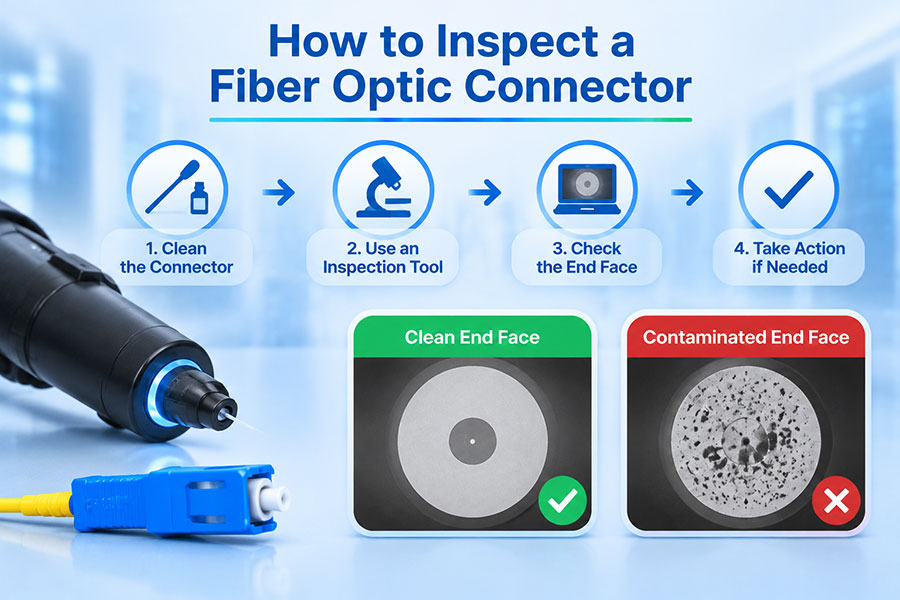
The recommended approach is to inspect the connector before cleaning, clean only when necessary, and inspect it again afterward. This prevents unnecessary contact with the fiber end face and confirms whether the cleaning process was successful.
Inspect: Examine the connector end face using a suitable fiber inspection microscope.
Assess: Identify dust, oil, residue, scratches, pits, or other defects.
Clean: Use a compatible dry or approved wet-cleaning method if contamination is present.
Reinspect: Check the end face again to confirm that contamination has been removed.
Repeat if necessary: If contamination remains, repeat the appropriate cleaning procedure and inspect again.
Connect: Mate the connector only after it has passed the applicable inspection criteria.
This process is consistent with the principles of IEC 61300-3-35, which provides methods for visual inspection and classification of fiber-optic connector end faces.
4. How to Clean an LC or SC Optical Connector
LC and SC connectors are widely used in optical transceivers and fiber patch cords. Their cylindrical ferrules require cleaning materials designed for the corresponding connector size and interface.
For routine cleaning, a compatible mechanical one-click cleaner is commonly used. If oily contamination remains, an approved wet-to-dry method may be appropriate for the exposed connector end face.
Important considerations include:
Use a cleaner specifically designed for the connector type.
Keep the cleaning surface fresh and avoid reusing disposable materials.
Do not touch the ferrule end face with fingers or ordinary cloth.
Do not use household tissues, paper towels, or clothing.
Inspect the connector again before reconnecting it.
Cleaning a connector on a fiber patch cord is different from cleaning a recessed transceiver receptacle. Receptacles require compatible inspection probes and cleaning tools rather than ordinary external connector cleaners.
5. How to Clean an MPO/MTP Optical Connector
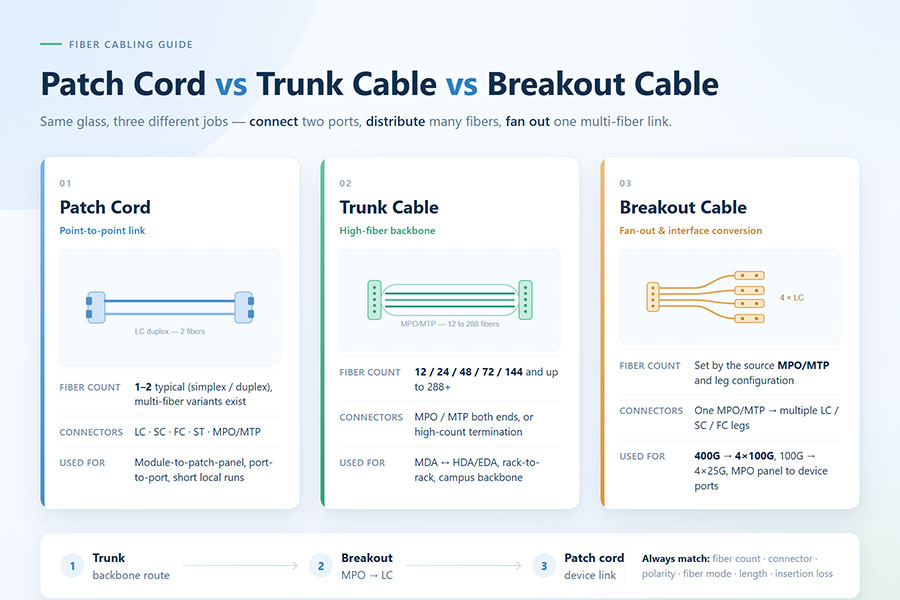
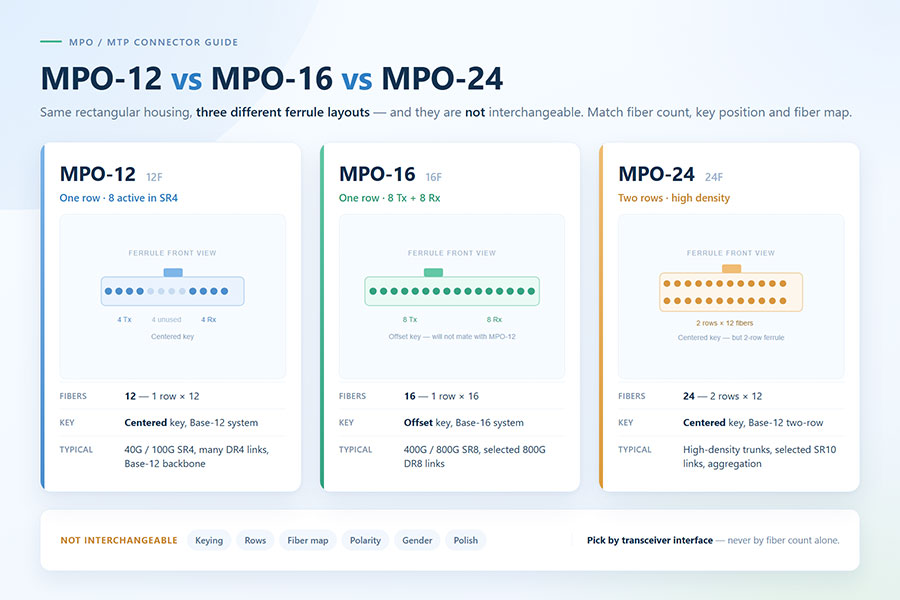
MPO/MTP connectors are commonly used in parallel-optics applications, including 100G, 400G, and 800G optical networks. Unlike a single-fiber LC connector, an MPO/MTP interface contains multiple optical fibers arranged in a rectangular ferrule.
Contamination on even one fiber position can affect an individual optical lane or cause link-level errors. The full connector end face must therefore be inspected.
Important MPO/MTP cleaning considerations include:
Use a dedicated MPO/MTP inspection probe with a suitable field of view.
Select a cleaning cassette or tool compatible with the connector configuration.
Check the complete fiber array rather than inspecting only the center positions.
Use the correct cleaning tool for pinned and unpinned connector configurations.
Inspect the guide-pin holes and surrounding ferrule area where applicable.
Reinspect the complete end face after cleaning.
MPO/MTP connectors have different mechanical configurations and cleaning requirements. The selected tool must match the connector design and manufacturer recommendations.
6. Cleaning an Optical Transceiver Receptacle
An optical transceiver receptacle is the interface inside the module that receives the fiber connector. It is different from the exposed ferrule of a patch cord and may require a specialized inspection probe and receptacle-cleaning tool.
Cleaning this interface requires particular care because the optical components are located inside the module. An unsuitable swab, excessive liquid, or incorrect insertion can damage the internal optical interface.
General precautions include:
Use only inspection probes and cleaning tools approved for the specific receptacle.
Follow the transceiver manufacturer's maintenance instructions.
Do not insert ordinary cotton swabs or improvised cleaning materials.
Avoid applying liquid directly into the transceiver port.
Do not force a cleaning tool into the receptacle.
Do not attempt to clean internal optical components that are not designed for field maintenance.
7. Dry Cleaning and Wet-to-Dry Cleaning Methods
Fiber connector cleaning generally uses dry cleaning, wet-to-dry cleaning, or a combination selected according to the type of contamination and the connector manufacturer's recommendations.
| Method | How It Works | Suitable Conditions |
|---|---|---|
| Dry cleaning | Uses specialized cleaning tape, fabric, or a mechanical cleaner to remove particles. | Loose dust and routine connector contamination. |
| Wet-to-dry cleaning | Uses an approved cleaning solution to loosen residue, followed by a dry cleaning surface to remove remaining liquid and particles. | Oily contamination and residue that dry cleaning does not remove. |
| Combined cleaning | Uses a suitable sequence of dry and wet cleaning followed by inspection. | Contamination that requires more than one cleaning approach. |
Dry cleaning is convenient for routine maintenance. However, some dry-cleaning materials can generate static charge under certain conditions, potentially attracting additional particles. Wet-to-dry cleaning can help remove oily residue, but the solution and procedure must be appropriate for the connector.
Do not assume that a cleaning method suitable for an exposed patch-cord connector is also suitable for an internal transceiver receptacle.
8. Common Mistakes When Cleaning Optical Connectors
Incorrect cleaning practices can introduce contamination or cause permanent damage. The following mistakes should be avoided:
| Cleaning Mistake | Potential Consequence | Better Practice |
|---|---|---|
| Wiping the connector on clothing | Additional dust, fibers, and oily residue. | Use approved lint-free fiber cleaning materials. |
| Using ordinary paper or tissue | Lint and particles may remain on the end face. | Use dedicated optical cleaning wipes. |
| Touching the ferrule end face | Fingerprints and oil contamination. | Handle connectors by their housing. |
| Using an incompatible cleaner | Incomplete cleaning or mechanical damage. | Match the tool to the connector type. |
| Applying excessive cleaning liquid | Residue or liquid entering the optical interface. | Follow the approved wet-cleaning procedure. |
| Reusing cleaning materials | Previously removed contamination may be transferred back. | Use a fresh cleaning surface for each operation. |
| Skipping post-cleaning inspection | Remaining contamination or damage may go unnoticed. | Inspect again before making the connection. |
| Assuming protective caps are clean | Particles from the cap may contaminate the connector. | Inspect and clean the connector after removing its cap. |
9. How Dirty Connectors Affect Optical Performance
Connector contamination can affect several optical performance parameters. The impact depends on the contamination type, location, connector condition, and optical interface.
Insertion loss: Contamination can obstruct the optical path and increase signal attenuation.
Return loss: Surface contamination or poor physical contact can increase optical reflections.
Receive optical power: Additional connector loss can reduce the optical power reaching the receiver.
Bit error rate: Reduced optical margin may contribute to transmission errors, especially when the link is already operating near its limits.
Lane imbalance: In multi-fiber connectors, contamination affecting individual fibers can produce uneven optical performance across lanes.
Connector damage: Hard particles trapped between mating surfaces can create scratches or defects that cannot be removed through cleaning.
In high-speed optical links, a contaminated connector may cause intermittent errors or prevent a link from reaching its expected performance. Cleaning is therefore part of physical-layer maintenance, not simply an aesthetic procedure.
10. Optical Connector Cleaning and Inspection Checklist
A consistent maintenance process helps reduce contamination-related failures and supports reliable optical connections.
Use an appropriate fiber inspection microscope.
Confirm that the inspection equipment is suitable for the connector type.
Check the connector end face before cleaning.
Select a compatible dry or wet-to-dry cleaning method.
Use fresh, lint-free cleaning materials.
Avoid touching the optical end face.
Inspect again after cleaning.
Check the mating receptacle using suitable equipment where required.
Keep unused connectors protected with clean protective caps.
Record inspection or test results when required by the network maintenance process.
For acceptance testing, IEC 61300-3-35 provides visual inspection criteria for connector end faces. Visual inspection should be considered alongside optical performance measurements such as attenuation and return loss where required by the application.
11. Conclusion
Cleaning an optical transceiver connector correctly helps maintain low insertion loss, reduce optical reflections, and prevent contamination-related link failures. The most reliable approach is to inspect the connector, use a compatible cleaning method, and inspect it again before reconnecting it.
LC, SC, and MPO/MTP connectors require different cleaning tools, while internal transceiver receptacles need specialized equipment and manufacturer-approved procedures. Avoid improvised materials, excessive liquid, and unnecessary contact with optical surfaces.
As data center networks move toward 400G, 800G, and 1.6T connectivity, connector inspection and cleaning become increasingly important for maintaining stable optical performance across high-density interfaces. C-LIGHT provides optical transceiver solutions for data center, enterprise, and telecommunications applications. For product specifications and technical assistance, visit the C-LIGHT optical transceiver product range or Contact C-LIGHT.
 >

 >
 >
 >
 >
 >
 >
 >