TEL:+86 132 6656 7067




Optical transceiver compatibility determines whether a module can be recognized by a network device, establish the intended link, and maintain reliable data transmission. Matching the connector or nominal data rate is only the starting point. Successful deployment also depends on form factor, host electrical interface, optical specification, fiber plant, firmware support, module coding and the configuration at both ends of the link.
In data center, enterprise and telecom networks, a compatible transceiver must satisfy several independent requirements. A module may fit physically but operate at an unsupported speed, use the wrong fiber type, exceed the platform's power or thermal limits, or be rejected by device software. A structured compatibility check reduces installation failures and helps distinguish hardware issues from configuration and optical-link problems.
1. What Does Optical Transceiver Compatibility Mean?
Optical transceiver compatibility is the ability of a module to operate correctly with a host device and the intended transmission link. It covers physical installation, electrical signaling, protocol support, optical performance, management behavior and vendor-specific qualification.
| Compatibility Layer | What Must Match | Typical Failure Symptom |
|---|---|---|
| Physical | Module form factor, cage, latch and connector type | Module cannot be installed correctly or the cable cannot be connected |
| Electrical | Host lane rate, signaling, lane mapping and supported interface mode | Module is detected but the port cannot establish the intended link |
| Protocol | Ethernet, Fibre Channel or another supported interface standard | Link remains down or the interface operates in an unsupported mode |
| Optical | Wavelength, reach, optical power budget and modulation specification | Low receive power, excessive errors or unstable connectivity |
| Device software | Module support, firmware, operating system and configuration | Unsupported-transceiver warning, port restriction or missing diagnostics |
| Operational | Power class, temperature range, airflow and management features | Overtemperature, port shutdown or incomplete monitoring |
Compatibility should therefore be assessed as an end-to-end requirement rather than a single product attribute. The host, transceiver, fiber or cable assembly, remote transceiver and configured interface must all work together.
2. Form Factor and Port Compatibility
The first check is whether the module belongs to a form factor supported by the target device and port. Common datacom form factors include SFP, SFP+, SFP28, SFP56, QSFP+, QSFP28, QSFP56, QSFP-DD, QSFP112 and OSFP.
| Form Factor | Common Data Rate Class | Compatibility Considerations |
|---|---|---|
| SFP | Typically 1G-class, depending on specification | Confirm whether the port supports the required speed and media type. |
| SFP+ | 10G-class | Some ports support lower speeds, but support is platform-dependent. |
| SFP28 | 25G-class | Check 10G/25G operating modes and supported module types. |
| QSFP+ | 40G-class | Verify the port's supported 40G modes and any breakout capability. |
| QSFP28 | 100G-class | Check 100G PMD support, lane configuration and breakout options. |
| QSFP-DD | Commonly 200G, 400G or 800G, depending on module generation | Confirm exact port generation, module support and host interface mode. |
| QSFP112 | Commonly used for 400G-class implementations | Verify host electrical lane rate and platform-specific support. |
| OSFP | Commonly used for 400G and 800G; newer systems may support higher rates | Check the exact OSFP variant, thermal requirements and device qualification. |
These are broad product-family associations, not guarantees of interoperability. A port's mechanical fit does not prove that its electrical interface, firmware or thermal design supports a particular module.
Some platforms support selected backward-compatible modules or lower-speed operation. Others restrict the available combinations. Always verify the host device model, port type, line-card configuration and software release.
3. Data Rate, Lane Mapping and Protocol Support
The module's nominal aggregate data rate must match a mode supported by the host port. High-speed modules may use multiple electrical and optical lanes, and the lane arrangement can differ even when two products advertise the same aggregate rate.
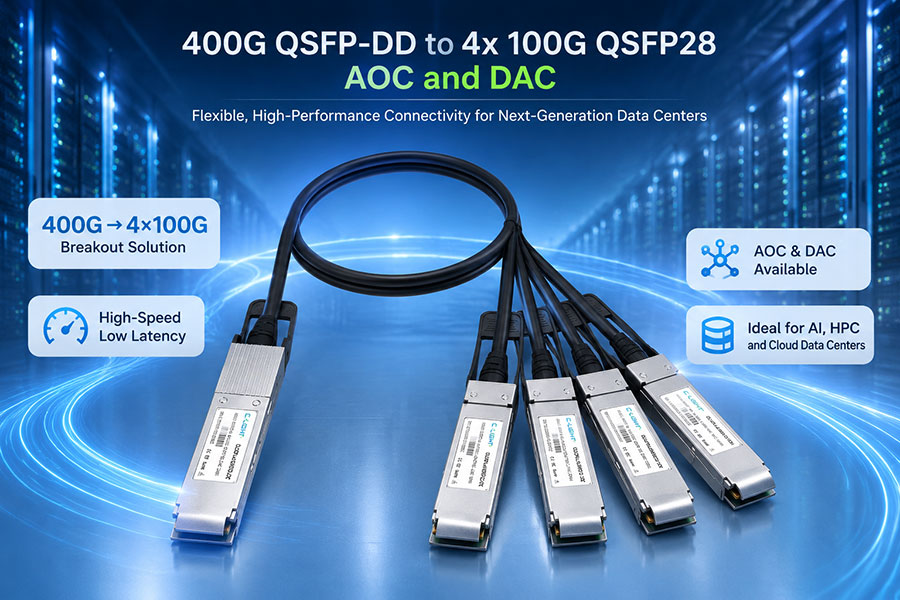
For example, 400G implementations may use eight 50G-class lanes or four 100G-class optical lanes, depending on the interface and PMD. A 400G-to-4×100G breakout configuration also requires a host port that supports the appropriate lane mapping and breakout mode.
| Check | What to Verify |
|---|---|
| Aggregate rate | The port supports the module's required operating speed. |
| Lane count and rate | Electrical and optical lane arrangements are supported by the host and module. |
| Protocol | The module and port support the required Ethernet, Fibre Channel or other interface standard. |
| Breakout mode | The port supports the intended split, such as 400G to 4×100G, including the correct cable and lane mapping. |
| Autonegotiation and FEC | Both ends support compatible settings for the selected interface. |
FEC requirements deserve particular attention at higher data rates. If the host interface or optical specification requires a specific FEC mode, the configuration must support it. A link may fail to come up or may experience errors when the two ends use incompatible settings.
4. Wavelength, Fiber Type and Connector Compatibility
Even when two transceivers have the same data rate and connector style, their optical interfaces may be incompatible. The wavelength, fiber type, transmission distance, optical lane arrangement and connector polish must all be considered.
| Optical Category | Typical Fiber | Connector or Interface | Key Compatibility Requirement |
|---|---|---|---|
| SR / SR4 | Multimode fiber | LC duplex or parallel-fiber connector, depending on the variant | Match the multimode grade, reach, wavelength and optical lane configuration. |
| DR / DR4 | Single-mode fiber | LC duplex or MPO-family connector, depending on the variant | Match single-mode specifications, lane count and connector mapping. |
| FR / FR4 | Single-mode fiber | Often LC duplex | Verify the wavelength plan, optical interface specification and reach. |
| LR / LR4 | Single-mode fiber | Often LC duplex | Confirm the specified distance, wavelength arrangement and link budget. |
| BiDi | Typically single-mode fiber | Usually a single LC optical interface | Use a complementary wavelength pair with the correct transmit/receive direction. |
| DAC / AOC | Electrical copper or integrated optical cable | Fixed or integrated cable ends | Confirm cable type, length, speed, host support and end-to-end compatibility. |
These categories cover common examples; specific products may use different connectors and implementations. Always check the complete product specification rather than relying on the family name alone.
4.1 Single-Mode and Multimode Fiber
Single-mode and multimode optics are designed for different fiber characteristics. A module intended for single-mode fiber should not be assumed to work correctly over a multimode link, or vice versa, merely because the connectors fit.
4.2 Wavelength Matching
For conventional duplex links, the transmitting wavelength of one endpoint must be appropriate for the receiving interface at the other endpoint. BiDi links require complementary wavelength variants so that each end transmits and receives on the intended wavelengths. Using two identical BiDi variants where a complementary pair is required can prevent communication.
4.3 Connector and Polarity
LC, MPO/MTP and other connector systems differ in physical design and optical lane arrangement. Parallel-fiber connections must use the correct polarity and lane mapping. Connector cleanliness and proper mating are also essential to maintaining the optical power budget.
5. Vendor Coding, Firmware and Device Qualification
Some switches and routers evaluate module identification data, vendor coding, supported product IDs and software compatibility before enabling a transceiver. As a result, a module that meets the optical specification may still be rejected or may have limited support on a particular platform.
Device support can depend on:
Switch or router model and hardware revision.
Port or line-card type.
Operating system and minimum software release.
Supported transceiver product ID and coding profile.
Module power class and thermal requirements.
Available diagnostics and vendor support policy.
Vendor qualification policies are not identical. Some platforms accept a broad range of compatible third-party optics, while others restrict support to listed products. A third-party module's successful link-up does not necessarily mean the device vendor will provide support for it.
Check the target platform's official compatibility matrix and release documentation. For example, Cisco provides an Optics-to-Device Compatibility Matrix for checking transceiver and device combinations. Availability in a matrix is specific to the platform and listed conditions; it should not be generalized to all hardware models.
6. Can Transceivers from Different Vendors Work Together?
Yes, transceivers from different manufacturers can interoperate when both endpoints support the same applicable optical standard and their optical characteristics meet the link requirements. However, standard compliance alone does not guarantee that every host platform will recognize or officially support every module.
For a link between different switch brands, verify both sides independently:
Confirm that each device supports its installed module and the required port speed.
Confirm that both modules implement compatible optical interfaces.
Check the fiber type, connector, wavelength and link distance.
Validate FEC, autonegotiation and interface configuration.
Confirm that each platform accepts the module and provides the required management support.
Interoperability should be tested with the actual device models and software releases when the deployment is business-critical. Two modules that work individually on their respective switches may still fail to establish a link if the optical interface or port configuration differs.
7. Breakout Compatibility: 400G, 800G and Higher-Speed Ports
Breakout allows one high-speed host port to connect to multiple lower-speed interfaces. It is useful for connecting high-density switches to servers, storage systems or lower-speed aggregation ports, but it requires explicit support from the host and compatible cable or module architecture.
| Example Configuration | Compatibility Checks |
|---|---|
| 400G to 4×100G | Confirm 400G host breakout support, four 100G lanes, correct mapping and remote interfaces. |
| 400G to 2×200G | Verify that the specific host port, module and cable support the required two-way split. |
| 800G to 2×400G | Check supported 800G breakout modes, lane mapping and endpoint module specifications. |
| 800G to 8×100G | Verify that the platform and optical/electrical assembly support this exact breakout arrangement. |
These are examples of possible configurations, not universal capabilities of every 400G or 800G port. The module's electrical interface, the cable assembly, the switch ASIC and the operating system must all support the selected mode.
8. Compatibility of DAC, AOC and Optical Transceivers
Direct Attach Copper (DAC), Active Optical Cable (AOC) and pluggable optical transceivers solve different connectivity requirements. Their compatibility checks overlap, but the transmission medium and supported distance differ.
| Connection Type | Medium | Typical Use | Compatibility Considerations |
|---|---|---|---|
| DAC | Electrical copper cable | Short connections within racks or between nearby equipment | Check host port support, cable length, speed and passive or active implementation. |
| AOC | Integrated optical cable | Short- to medium-distance equipment interconnects | Check supported speed, length, end coding, breakout type and host compatibility. |
| Pluggable optical modules | Optical transceivers plus fiber | Links requiring replaceable optics, selected fiber types or longer reach | Check both transceivers, fiber plant, wavelengths, optical budget and port support. |
A DAC or AOC assembly may use the same connector family as a pluggable module but does not necessarily have the same supported port modes or management behavior. Confirm the exact cable part number and the supported host-device combinations.
9. Troubleshooting an Incompatible Optical Transceiver
When a link fails to come up, troubleshoot from physical recognition to optical performance and protocol configuration. This sequence helps isolate the cause without assuming that every link failure is due to the transceiver itself.
Compatibility troubleshooting checklist
Verify the exact module part number and host-device support.
Check whether the switch detects the module and reports any unsupported-module or power warning.
Confirm the configured port speed, lane mode and breakout configuration.
Check fiber type, connector cleanliness, polarity and wavelength pairing.
Review transmit and receive optical power, temperature, voltage and other available diagnostics.
Check FEC, autonegotiation, interface settings and error counters.
Confirm the software release and whether the module requires a supported firmware version.
Test with a known-compatible module or cable, where available and appropriate.
| Symptom | Possible Cause | Useful Diagnostic |
|---|---|---|
| Module is not detected | Unsupported form factor, module identification issue, seating problem or port restriction | Inspect device logs, module inventory and platform support information. |
| Module is detected but link stays down | Incorrect speed, incompatible optical PMD, fiber issue or configuration mismatch | Check interface status, optical specification and remote-end configuration. |
| Link comes up but has errors | Insufficient optical margin, dirty connectors, incompatible FEC settings or signal-quality issue | Review optical power, FEC counters and physical-layer error statistics. |
| Breakout interfaces fail selectively | Lane mapping, polarity or unsupported breakout mode | Check lane mapping and the cable or module's breakout specification. |
| Diagnostics are unavailable | Module or platform does not support the required monitoring feature | Check DDM/DOM support and the device's software documentation. |
Diagnostic readings should be compared against the specific module's datasheet and the platform's documented limits. DDM/DOM support and the available fields vary by product and host implementation.
10. A Practical Compatibility Validation Process
Before purchasing or installing transceivers, gather the device and link information needed to verify the complete connection. This is particularly important for multi-vendor environments and high-speed breakout designs.
Identify the host: Record switch or router model, port number, line card and software release.
Define the interface: Specify required data rate, protocol, lane mapping and breakout mode.
Identify the module: Confirm form factor, product ID, optical standard, wavelength, reach and power requirements.
Validate the link: Match fiber type, connector, polarity, distance and optical budget.
Check platform support: Review the device vendor's compatibility documentation and support policy.
Test the complete connection: Verify link establishment, traffic, error counters and diagnostics under the intended configuration.
For repeatable procurement, maintain a compatibility record containing host model, software version, module part number, link type, remote-end device, tested speed and validation result. This makes future replacement and expansion more predictable.
11. Frequently Asked Questions
11.1 Does the Same Form Factor Guarantee Compatibility?
No. The form factor addresses physical and some interface characteristics, but data rate, electrical signaling, optical specification, coding, firmware and platform support must also match.
11.2 Can I Use a Third-Party Optical Module in a Branded Switch?
It depends on the switch model, software release and vendor policy. Check the official compatibility documentation and support terms for the exact platform. Successful detection or link-up does not necessarily guarantee vendor support.
11.3 Can Two Different Vendors' Optical Modules Communicate?
They can when both modules support compatible optical specifications and the host devices support the modules and configured interfaces. Validate wavelength, fiber, reach, lane arrangement and required link settings.
11.4 Why Does a Compatible Module Still Fail to Establish a Link?
Possible causes include incorrect fiber polarity, unsupported port speed, mismatched FEC or autonegotiation settings, insufficient optical power, connector contamination or a configuration issue at the remote endpoint.
11.5 Are 400G and 800G Modules Interchangeable?
Not automatically. Form factor, host port generation, electrical interface, supported module type and operating mode all matter. A port that accepts a particular module mechanically may not support its intended rate or features.
11.6 What Information Is Needed to Verify Compatibility?
Provide the switch or router model, software version, port speed, module part number, required distance, fiber type, connector type and remote-end device. For breakout links, include the desired lane mapping and cable configuration.
12. Conclusion
Optical transceiver compatibility depends on more than connector fit or advertised data rate. Physical form factor, electrical lane mapping, protocol, wavelength, fiber type, link budget, module coding, firmware and thermal requirements all influence whether a connection will operate reliably.
For multi-vendor networks, the most reliable approach is to validate both host platforms and the complete optical path before deployment. A documented compatibility process reduces link failures, simplifies troubleshooting and helps ensure that replacement modules meet the same operational requirements as the original equipment.
Prepare the device model, module part number, data rate, fiber type and link distance to help confirm the required compatibility conditions.
Contact C-LIGHT >
>

 >
>
 >
>
 >
>
 >
>
 >
>
 >
>
 >
>